
Put your mac to sleep
A quick way to put your mac to sleep is :
Hold down the keys Option+Command+Eject
This will put your mac to sleep, not just your display.
These are some simple keyboard shortcuts you can use to quickly shutdown your mac. First off :
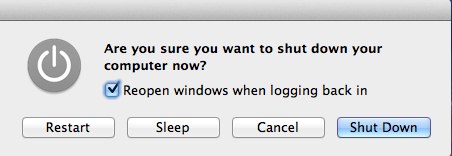
If you want a quick menu option of shutdown command, press ctrl+eject, once you press that combination you will be faced with the menu below.
A quick way to put your mac to sleep is :
Hold down the keys Option+Command+Eject
This will put your mac to sleep, not just your display.
This gives you the option to quit all your running application, so it gives you the options to save your work. (Pre Lion). On Lion it will just restart
Ctrl+Command+Eject
This gives you the option to quit all your running applications , it gives you the options to save your work. (Pre Lion). On Lion it will just shut your mac down.
Ctrl+Option+Command+Eject
I am always interested in feedback so please feel free to add any comments, or you can mail me here. If you would like to submit a quick tip with full credit and links back to your site then also feel free to contact me.